
Presentation Slides: They’re Just a Message Delivery System!
Create Slides That Manage Your Message
Every organization holds periodic management reviews of current programs, projects and initiatives. We have all experienced them: we share the current financial outlook of a project compared to the initial plan, we identify any changes in strategic direction, and we highlight to the executives any new challenges that have emerged. Of course, the overall intent of such internal reviews is to gather feedback and obtain help from senior members of the business.
I participated in one such project review the other day, during which the project manager, the product development team and other individuals presented their respective portions of the program effort. The audience consisted of about 20 individuals, all of whom sat in the conference room for those two hours.
More is Not Always Better
When it came time for the technical portion of the presentation, a young, high-energy developer named Jake stood up to present his design. Jake spoke clearly, and explained his various decision points and challenges to the meeting participants. Shortly into his 30 minute segment, however, the questions began to surface.
RELATED: How To Make an Executive Summary (w/ Sample Slides)
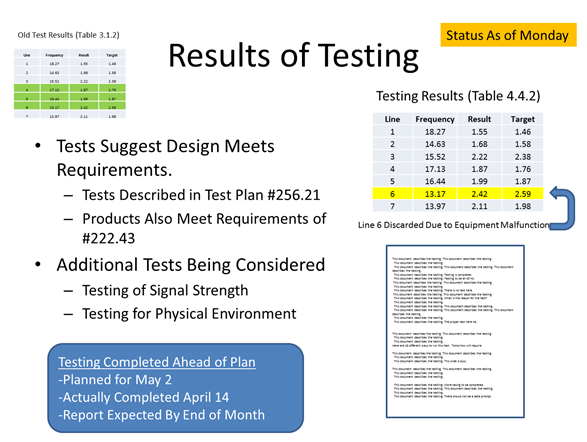
It was clear from the discussion that Jake knew what he was talking about and had a lot of information to discuss. Unfortunately, though, his slides were full of data, pictures and commentary. While all of the information was relevant to the project and what he was working on, there was simply too much of it.
Listening to Jake and observing his slides, the audience repeatedly veered off topic, often confused or seeking clarification. “You say the tests showed the technology will work, but you’re also saying you are planning more testing. Why?” As the young developer continued through his slides, more questions and comments came in response to the data and notations on the screen. People were simply confused.
The 30 minute slot soon approached an hour, at which time Jake began stumbling through his presentation as more questions were asked. His frustration morphed into despair. Some of us who were familiar with the project started jumping in occasion to give him a break and help explain his points to the broader group.
When Jake sat back down at the end his portion of the review, he was visibly unhappy with his performance in the spotlight. The feedback was not at all negative; but he knew he could have done better. In his effort to put all the information out there so he could show what he had been working on, Jake ended up making a set of presentation slides that were too complex. The overabundance of detail simply led his audience astray.
Coaching an Employee After A Mistake
Later that afternoon, I brought Jake into my office to give him a pep talk. He was still upset that his presentation drew so many comments and questions, especially since he had prepared extensively and was expecting it to go well. As Jake often did, he beat himself up over the experience.
“I could have done better” he said. I cut him off and explained to him where he went wrong.
“When making a presentation, the primary purpose of your slides is to support your message” I said.
His head still hung down. I continued.
“You need to remember that your slides are simply a message delivery system, not the central vault for all your data.”
We talked at length about what happened, and how he could improve the next time. I suggested the most important thing to focus on was keeping his slides clean, full of white space, and to use them to facilitate discussion. Too much information, I told him, diluted his message.
“Less is more.”
8 Simple Tips for Making Better Slides:
- Value white space to make slides easy to digest
- Everything on the slide should have a purpose
- Omit extraneous details you can explain verbally
- Use colors and shapes to highlight key information
- Use back-up slides for relevant data that may be needed
- Be economical with words and use bulleted points
- Slides should help you manage the desired message
- The sequence of slides should help tell a story
Presentation slides are simply a message delivery system. They should be clean, to the point and designed to guide a discussion. When they contain too much data and excessive commentary, they will weaken your overall message.
For more information, see our step by step guide detailing how you create a great slide presentation.
Looking for More on Communication? You Might Like…
How to Justify Adding Staff – A Sample Presentation
How Are You Communicating With Customers?
Motivating Employees: Saying the Right Thing at the Right Time